
Displaying an Animation#
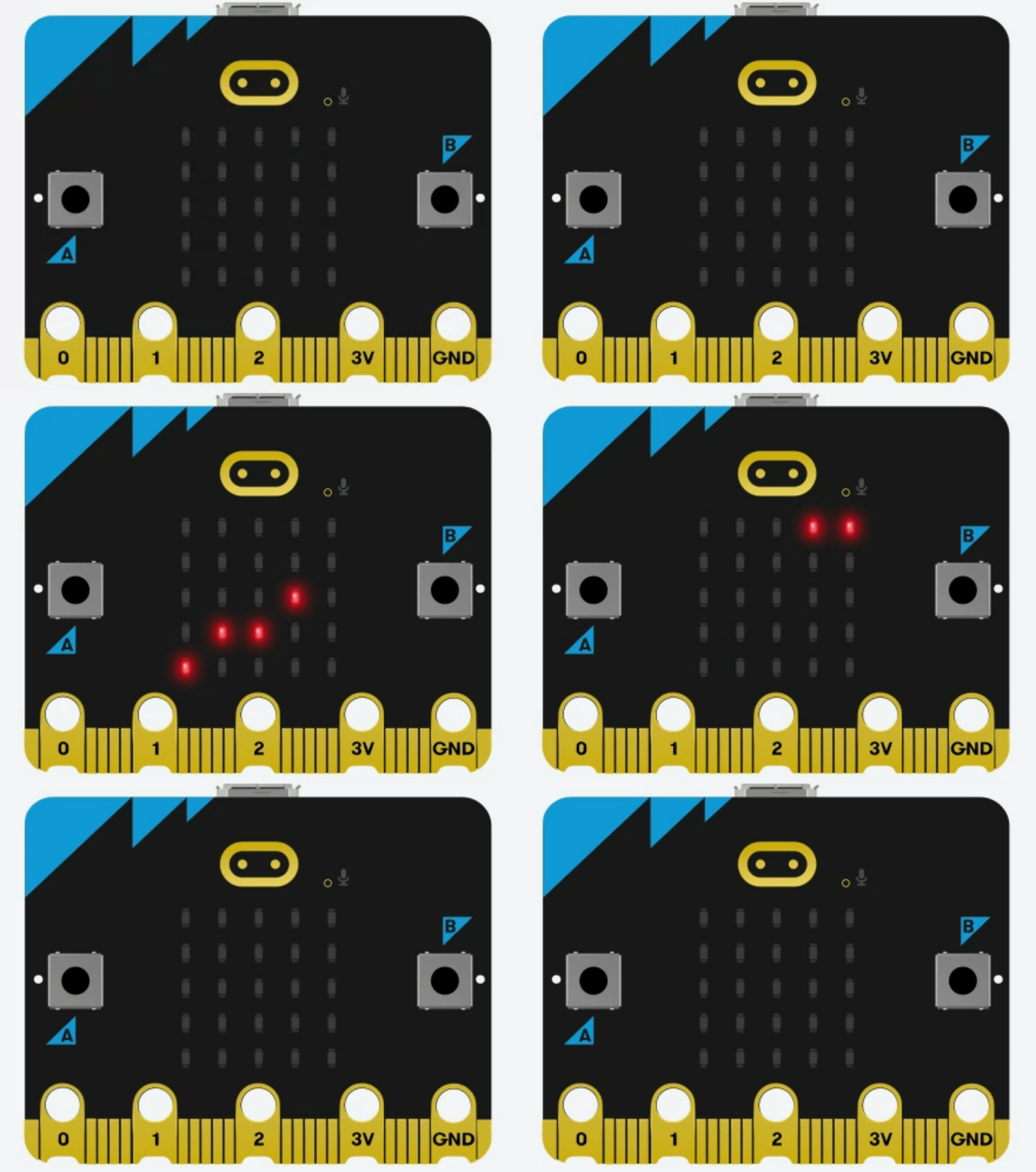
The animation of the snake above is produced using the code for custom images. Each image is slightly different than the next image, and the sequence of images is repeated indefinitely in a while loop. Below are three equivalent programs that display the animation.
The first program uses the multi-lined custom image style and displays each image with a delay in the
whileloop.The second program uses the single-lined custom image style and displays each image with a delay in the
whileloop.The third program uses the single-lined custom image style and collects them in a
# Imports go at the top
from microbit import *

# Create a custom image of a coyote
# First frame of the animation
snake_01 = Image("00000:"
                 "00000:"
                 "00000:"
                 "00000:"
                 "00000")
# Second frame of the animation
snake_02 = Image("00000:"
                 "00000:"
                 "00000:"
                 "00000:"
                 "90000")
# Third frame of the animation
snake_03 = Image("00000:"
                 "00000:"
                 "00000:"
                 "09000:"
                 "90000")
# Fourth frame of the animation
snake_04 = Image("00000:"
                 "00000:"
                 "00000:"
                 "09900:"
                 "90000")
# Fifth frame of the animation
snake_05 = Image("00000:"
                 "00000:"
                 "00090:"
                 "09900:"
                 "90000")
# Sixth frame of the animation
snake_06 = Image("00000:"
                 "00090:"
                 "00090:"
                 "09900:"
                 "90000")
# Seventh frame of the animation
snake_07 = Image("00090:"
                 "00090:"
                 "00090:"
                 "09900:"
                 "00000")
# Eighth frame of the animation
snake_08 = Image("00099:"
                 "00090:"
                 "00090:"
                 "00900:"
                 "00000")
# Ninth frame of the animation
snake_09 = Image("00099:"
                 "00090:"
                 "00000:"
                 "00000:"
                 "00000")
# Tenth frame of the animation
snake_10 = Image("00099:"
                 "00000:"
                 "00000:"
                 "00000:"
                 "00000")
# Eleventh frame of the animation
snake_11 = Image("00009:"
                 "00000:"
                 "00000:"
                 "00000:"
                 "00000")
# Twelfth frame of the animation
snake_12 = Image("00000:"
                 "00000:"
                 "00000:"
                 "00000:"
                 "00000")

# Code in a 'while True:' loop repeats forever
while True:
    # Display the animation
    display.show(snake_01) # First frame of the animation
    sleep(250)             # Wait for 250ms (0.25 seconds)
    display.show(snake_02) # Second frame of the animation
    sleep(250)             # Wait for 250ms (0.25 seconds)
    display.show(snake_03) # Third frame of the animation
    sleep(250)             # Wait for 250ms (0.25 seconds)
    display.show(snake_04) # Fourth frame of the animation
    sleep(250)             # Wait for 250ms (0.25 seconds)
    display.show(snake_05) # Fifth frame of the animation
    sleep(250)             # Wait for 250ms (0.25 seconds)
    display.show(snake_06) # Sixth frame of the animation
    sleep(250)             # Wait for 250ms (0.25 seconds)
    display.show(snake_07) # Seventh frame of the animation
    sleep(250)             # Wait for 250ms (0.25 seconds)
    display.show(snake_08) # Eighth frame of the animation
    sleep(250)             # Wait for 250ms (0.25 seconds)
    display.show(snake_09) # Ninth frame of the animation
    sleep(250)             # Wait for 250ms (0.25 seconds)
    display.show(snake_10) # Tenth frame of the animation
    sleep(250)             # Wait for 250ms (0.25 seconds)
    display.show(snake_11) # Eleventh frame of the animation
    sleep(250)             # Wait for 250ms (0.25 seconds)
    display.show(snake_12) # Twelfth frame of the animation
    sleep(250)             # Wait for 250ms (0.25 seconds)
# Imports go at the top
from microbit import *

# Create a custom animation of a snake
# First frame of the animation
snake_01 = Image("00000:00000:00000:00000:00000")
# Second frame of the animation
snake_02 = Image("00000:00000:00000:00000:90000")
# Third frame of the animation
snake_03 = Image("00000:00000:00000:09000:90000")
# Fourth frame of the animation
snake_04 = Image("00000:00000:00000:09900:90000")
# Fifth frame of the animation
snake_05 = Image("00000:00000:00090:09900:90000")
# Sixth frame of the animation
snake_06 = Image("00000:00090:00090:09900:90000")
# Seventh frame of the animation
snake_07 = Image("00090:00090:00090:09900:00000")
# Eighth frame of the animation
snake_08 = Image("00099:00090:00090:00900:00000")
# Ninth frame of the animation
snake_09 = Image("00099:00090:00000:00000:00000")
# Tenth frame of the animation
snake_10 = Image("00099:00000:00000:00000:00000")
# Eleventh frame of the animation
snake_11 = Image("00009:00000:00000:00000:00000")
# Twelfth frame of the animation
snake_12 = Image("00000:00000:00000:00000:00000")

# Code in a 'while True:' loop repeats forever
while True:
    # Display the animation
    display.show(snake_01) # First frame of the animation
    sleep(250)             # Wait for 250ms (0.25 seconds)
    display.show(snake_02) # Second frame of the animation
    sleep(250)             # Wait for 250ms (0.25 seconds)
    display.show(snake_03) # Third frame of the animation
    sleep(250)             # Wait for 250ms (0.25 seconds)
    display.show(snake_04) # Fourth frame of the animation
    sleep(250)             # Wait for 250ms (0.25 seconds)
    display.show(snake_05) # Fifth frame of the animation
    sleep(250)             # Wait for 250ms (0.25 seconds)
    display.show(snake_06) # Sixth frame of the animation
    sleep(250)             # Wait for 250ms (0.25 seconds)
    display.show(snake_07) # Seventh frame of the animation
    sleep(250)             # Wait for 250ms (0.25 seconds)
    display.show(snake_08) # Eighth frame of the animation
    sleep(250)             # Wait for 250ms (0.25 seconds)
    display.show(snake_09) # Ninth frame of the animation
    sleep(250)             # Wait for 250ms (0.25 seconds)
    display.show(snake_10) # Tenth frame of the animation
    sleep(250)             # Wait for 250ms (0.25 seconds)
    display.show(snake_11) # Eleventh frame of the animation
    sleep(250)             # Wait for 250ms (0.25 seconds)
    display.show(snake_12) # Twelfth frame of the animation
    sleep(250)             # Wait for 250ms (0.25 seconds)
# Imports go at the top
from microbit import *

# Create a custom animation of a snake
# First frame of the animation
snake_01 = Image("00000:00000:00000:00000:00000")
# Second frame of the animation
snake_02 = Image("00000:00000:00000:00000:90000")
# Third frame of the animation
snake_03 = Image("00000:00000:00000:09000:90000")
# Fourth frame of the animation
snake_04 = Image("00000:00000:00000:09900:90000")
# Fifth frame of the animation
snake_05 = Image("00000:00000:00090:09900:90000")
# Sixth frame of the animation
snake_06 = Image("00000:00090:00090:09900:90000")
# Seventh frame of the animation
snake_07 = Image("00090:00090:00090:09900:00000")
# Eighth frame of the animation
snake_08 = Image("00099:00090:00090:00900:00000")
# Ninth frame of the animation
snake_09 = Image("00099:00090:00000:00000:00000")
# Tenth frame of the animation
snake_10 = Image("00099:00000:00000:00000:00000")
# Eleventh frame of the animation
snake_11 = Image("00009:00000:00000:00000:00000")
# Twelfth frame of the animation
snake_12 = Image("00000:00000:00000:00000:00000")


# Create a list of the frames of the animation
snakes = [snake_01, snake_02, snake_03, snake_04, snake_05, snake_06,
          snake_07, snake_08, snake_09, snake_10, snake_11, snake_12]

# Code in a 'while True:' loop repeats forever
while True:
    # Display the animation
    # Loop through each frame of the animation
    for snake in snakes:
        display.show(snake) # Display the current frame of the animation
        sleep(250)          # Wait for 250ms (0.25 seconds)